November 25, 2017

Java EE 7 Concurrency Utilities (JSR 236) and Example

Introduction

The Concurrency Utilities (JSR 236) is completely new in Java EE 7 and is also new in the Java EE mindset. In previous Java EE version the idea of creating new threads was forbidden and the motivation behind it was that thread was error prune and the standard components in Java EE should be enough. In Java EE 7 that has changed and the developer is free again to create threads.

But the above reason holds still true, that threads can help your application to scale better and increase performance, but it can also introduce:

  • Deadlocks
  • Thread starvation
  • Concurrent accessing of shared resources

Reference Oracle The Java EE 7 Tutorial Chapter 56.1 Concurrency Basics

And if you are new to Threads you should also read the Java Standard Edition Tutorial about Threads Oracle Java Tutorial Lesson: Concurrency. Which also points out the following pitfalls

  • Thread Interference describes how errors are introduced when multiple threads access shared data.
  • Memory Consistency Errors describes errors that result from inconsistent views of shared memory.
  • Synchronized Methods describes a simple idiom that can effectively prevent thread interference and memory consistency errors.
  • Implicit Locks and Synchronization describes a more general synchronization idiom, and describes how synchronization is based on implicit locks.
  • Atomic Access talks about the general idea of operations that can't be interfered with by other threads.

Reference Oracle Java Tutorial Synchronization

And if you are dead serious about threads you should read the book Java Concurrency in Practice by Brian Goetz.

Out first Thread

So now when we knew that we must pay extra attention when writing our threads, lets create a new thread. This can be done from either: java.lang.Runnable, java.lang.Thread or java.util.concurrent.Callable. The first two are there for backward compatibility and when writing new code always use java.util.concurrent.Callable.


package se.magnuskkarlsson.example.javaee7.task.control;

import java.util.concurrent.Callable;
import java.util.logging.Logger;

public class TaskCallable implements Callable<Integer> {

    private final Logger log = Logger.getLogger(TaskCallable.class.getName());

    private final String id;

    public TaskCallable(String id) {
        this.id = id;
    }
    
    @Override
    public Integer call() throws Exception {
        log.info("[" + id + "] Starting a long running task");
        for (int i = 0; i < 3; ++i) {
            log.info("[" + id + "] Analysing task...");
            // We simulate now a long running task
            Thread.sleep(3000);
        }
        log.info("[" + id + "] Finished a long running task");
        // return some dummy data
        return (int) (Math.random() * 100);
    }

}

Then we want to test. Lets test it with a simple JAX-RS class.


package se.magnuskkarlsson.example.javaee7.task.boundary;

import javax.annotation.PreDestroy;
import javax.annotation.Resource;
import javax.ejb.LocalBean;
import javax.ejb.Startup;
import javax.enterprise.concurrent.ManagedExecutorService;
import javax.inject.Singleton;
import javax.ws.rs.POST;
import javax.ws.rs.Path;
import javax.ws.rs.QueryParam;
import se.magnuskkarlsson.example.javaee7.task.control.TaskCallable;

@Startup
// we need to have only one and same instance, so we can clean up ManagedExecutorService
@Singleton
// Designates that a session bean exposes a no-interface view.
// This annotation is required if a session bean exposes any other client views 
// (local, remote, no-interface, 2.x Remote Home, 2.x Local Home, **Web Service**)
@LocalBean
@Path("/task")
public class TaskREST {

    @Resource
    ManagedExecutorService managedExecutorService;
    
    @PreDestroy
    public void destroy() {
        managedExecutorService.shutdownNow();
    }
    
    @POST
    public void create(@QueryParam("id") String id) {
        managedExecutorService.submit(new TaskCallable(id));
    }
    
}

And finally test with simple CURL commands.


$ curl -X POST http://localhost:8080/example-javaee7/rest/task?id=foo
$ curl -X POST http://localhost:8080/example-javaee7/rest/task?id=bar
$ curl -X POST http://localhost:8080/example-javaee7/rest/task?id=code
$ curl -X POST http://localhost:8080/example-javaee7/rest/task?id=nisse

Now we can see in the log that task are started, ran and finished.


21:45:12,129 INFO  [se.magnuskkarlsson.example.javaee7.task.control.TaskCallable] (EE-ManagedExecutorService-default-Thread-1) [foo] Starting a long running task
21:45:12,130 INFO  [se.magnuskkarlsson.example.javaee7.task.control.TaskCallable] (EE-ManagedExecutorService-default-Thread-1) [foo] Analysing task...
21:45:15,130 INFO  [se.magnuskkarlsson.example.javaee7.task.control.TaskCallable] (EE-ManagedExecutorService-default-Thread-1) [foo] Analysing task...
21:45:18,131 INFO  [se.magnuskkarlsson.example.javaee7.task.control.TaskCallable] (EE-ManagedExecutorService-default-Thread-1) [foo] Analysing task...
21:45:21,132 INFO  [se.magnuskkarlsson.example.javaee7.task.control.TaskCallable] (EE-ManagedExecutorService-default-Thread-1) [foo] Finished a long running task
21:45:33,249 INFO  [se.magnuskkarlsson.example.javaee7.task.control.TaskCallable] (EE-ManagedExecutorService-default-Thread-2) [bar] Starting a long running task
21:45:33,250 INFO  [se.magnuskkarlsson.example.javaee7.task.control.TaskCallable] (EE-ManagedExecutorService-default-Thread-2) [bar] Analysing task...
21:45:35,288 INFO  [se.magnuskkarlsson.example.javaee7.task.control.TaskCallable] (EE-ManagedExecutorService-default-Thread-3) [code] Starting a long running task
21:45:35,289 INFO  [se.magnuskkarlsson.example.javaee7.task.control.TaskCallable] (EE-ManagedExecutorService-default-Thread-3) [code] Analysing task...
21:45:36,250 INFO  [se.magnuskkarlsson.example.javaee7.task.control.TaskCallable] (EE-ManagedExecutorService-default-Thread-2) [bar] Analysing task...
21:45:38,209 INFO  [se.magnuskkarlsson.example.javaee7.task.control.TaskCallable] (EE-ManagedExecutorService-default-Thread-4) [nisse] Starting a long running task
21:45:38,210 INFO  [se.magnuskkarlsson.example.javaee7.task.control.TaskCallable] (EE-ManagedExecutorService-default-Thread-4) [nisse] Analysing task...
21:45:38,290 INFO  [se.magnuskkarlsson.example.javaee7.task.control.TaskCallable] (EE-ManagedExecutorService-default-Thread-3) [code] Analysing task...
21:45:39,251 INFO  [se.magnuskkarlsson.example.javaee7.task.control.TaskCallable] (EE-ManagedExecutorService-default-Thread-2) [bar] Analysing task...
21:45:41,210 INFO  [se.magnuskkarlsson.example.javaee7.task.control.TaskCallable] (EE-ManagedExecutorService-default-Thread-4) [nisse] Analysing task...
21:45:41,290 INFO  [se.magnuskkarlsson.example.javaee7.task.control.TaskCallable] (EE-ManagedExecutorService-default-Thread-3) [code] Analysing task...
21:45:42,251 INFO  [se.magnuskkarlsson.example.javaee7.task.control.TaskCallable] (EE-ManagedExecutorService-default-Thread-2) [bar] Finished a long running task
21:45:44,210 INFO  [se.magnuskkarlsson.example.javaee7.task.control.TaskCallable] (EE-ManagedExecutorService-default-Thread-4) [nisse] Analysing task...
21:45:44,290 INFO  [se.magnuskkarlsson.example.javaee7.task.control.TaskCallable] (EE-ManagedExecutorService-default-Thread-3) [code] Finished a long running task
21:45:47,211 INFO  [se.magnuskkarlsson.example.javaee7.task.control.TaskCallable] (EE-ManagedExecutorService-default-Thread-4) [nisse] Finished a long running task

Summary

The main class in Concurrency Utilities (JSR 236) are:

  • javax.enterprise.concurrent.ManagedExecutorService - which you can <T> Future<T> submit(Callable<T> task) task. java.util.concurrent.Future can also be preemptive shutdown by calling java.util.concurrent.Future#cancel(true).
  • The other that is just like above, but for the difference it can schedule threads for later, is javax.enterprise.concurrent.ManagedScheduledExecutorService.

November 24, 2017

The Java EE 8 specification (JSR 366) Released 18 Sep, 2017.

The Java EE 8 specification (JSR 366) was released 18 Sep 2017.

https://jcp.org/en/jsr/detail?id=366

"What's New in Java EE 8

Java EE 8 continues to improve API and programming models needed for today's applications and adds features requested by our world-wide community. This release modernizes support for many industry standards and continues simplification of enterprise ready APIs. Enhancements include:
  • Java Servlet 4.0 API with HTTP/2 support
  • Enhanced JSON support including a new JSON binding API
  • A new REST Reactive Client API
  • Asynchronous CDI Events
  • A new portable Security API
  • Server-Sent Events support (Client & Server-side)
  • Support for Java SE 8 new capabilities (e.g. Date & Time API, Streams API, annotations enhancements)"
Java EE 8 builds on Java EE 7. The following JSRs are new or updated in Java EE 8:
  • JSR 366 – Java EE 8 Platform
  • JSR 365 – Contexts and Dependency Injection (CDI) 2.0
  • JSR 367 – The Java API for JSON Binding (JSON-B) 1.0
  • JSR 369 – Java Servlet 4.0
  • JSR 370 – Java API for RESTful Web Services (JAX-RS) 2.1
  • JSR 372 – JavaServer Faces (JSF) 2.3
  • JSR 374 – Java API for JSON Processing (JSON-P)1.1
  • JSR 375 – Java EE Security API 1.0
  • JSR 380 – Bean Validation 2.0
  • JSR 250 – Common Annotations 1.3
  • JSR 338 – Java Persistence 2.2
  • JSR 356 – Java API for WebSocket 1.1
  • JSR 919 – JavaMail 1.6"
http://www.oracle.com/technetwork/java/javaee/overview/index.html

The Java EE 8 Tutorial
https://javaee.github.io/tutorial/

And the source code is now published on github
https://github.com/javaee/tutorial-examples

GlassFish 5.0 was released 21 Oct 2017 and is the reference implementation for Java EE 8
https://en.wikipedia.org/wiki/GlassFish


November 19, 2017

HTTP Keep-Alive aka Persistant Connection with Apache httpd

HTTP Keep-Alive is also known as persistent connection. In the HTTP response you have


Connection:Keep-Alive
Keep-Alive:timeout=5, max=100

And to configure this in Apache httpd


#
# KeepAlive: Whether or not to allow persistent connections (more than
# one request per connection). Set to "Off" to deactivate.
#
KeepAlive On

#
# MaxKeepAliveRequests: The maximum number of requests to allow
# during a persistent connection. Set to 0 to allow an unlimited amount.
# We recommend you leave this number high, for maximum performance.
#
MaxKeepAliveRequests 100

#
# KeepAliveTimeout: Number of seconds to wait for the next request from the
# same client on the same connection.
#
KeepAliveTimeout 5

NOTE: MaxKeepAlive is a counter that counts down for each request and after that is a new HTTP session renegotiated, that can be costly if HTTPS is used, but is necessary to clean up lingering HTTP sessions.


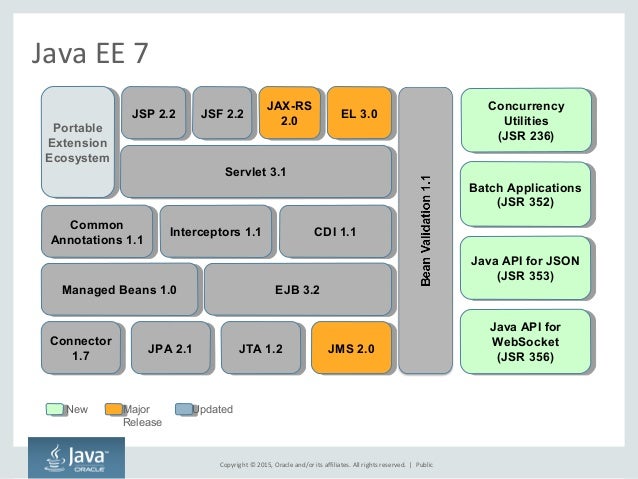
Java EE 7 and What is New?

Overview Java EE 7

https://image.slidesharecdn.com/javaee7inaction-150506105621-conversion-gate02/95/java-ee7-in-action-10-638.jpg?cb=1430927843

Reference https://www.slideshare.net/ankarajug/java-ee7-in-action

JMS 2.0
  • Fluent APIs
  • Unchecked exceptions
  • MDB activation properties, JMS resource definition, default
    JMS resources
Java API for WebSocket NEW

Java API for JSON Processing NEW

Bean Validation 1.1
  • Method constraints @javax.validation.Valid
JAX-RS 2.0
  • Client API
JPA 2.1
  • Schema generation javax.persistence.schema-generation.database.action
JSF 2.2
  • File upload component h:inputFile
Batch Applications for the Java Platform NEW

Concurrency Utilities for Java EE NEW


Java EE 7 Simple WebSocket Example

One of the new technologies in Java EE 7 is WebSockets. A killer use case for web sockets is when a client need push notifications from the server. Previously such a client needed to constantly ask the server if there were any updates, which was ineffective and consumed a lot of server cpu. So lets implement a simple chat application that uses web sockets.

First the server. The whole layout or architecture behind web sockets reminds us very much as with jax-rs annotations. We start with a @ServerEndpoint class annotation, just like rest @Path.

Then you have only one mandatory method @OnMessage public void onMessage(String message, Session session). The method input parameters can be different, please read the javadoc.

Then you have 3 optional methods documented here. @OnOpen, @OnClose and @OnError

I will implement all 4 methods. I will also remember all sessions and will use CDI annotation @ApplicationScoped for that, but for it to work, we need to put the data in a separate POJO and annotate that also with @ApplicationScoped and let CDI handle the lifecycle via @Inject.


package se.magnuskkarlsson.example.javaee7.chat.boundary;

import java.util.logging.Level;
import java.util.logging.Logger;
import javax.enterprise.context.ApplicationScoped;
import javax.inject.Inject;
import javax.websocket.OnClose;
import javax.websocket.OnError;
import javax.websocket.OnMessage;
import javax.websocket.OnOpen;
import javax.websocket.Session;
import javax.websocket.server.ServerEndpoint;

@ServerEndpoint("/chat")
@ApplicationScoped
public class ChatWebSocketServer {

    private final Logger log = Logger.getLogger(ChatWebSocketServer.class.getName());
    @Inject ChatSessions sessions;

    @OnOpen
    public void open(Session session) {
        sessions.getSessions().put(session.getId(), session);
        log.info("OPEN session " + session.getId());
        log.info("size " + sessions.getSessions().size());
    }

    @OnClose
    public void close(Session session) {
        sessions.getSessions().remove(session.getId());
        log.info("CLOSE session " + session.getId());
        log.info("size " + sessions.getSessions().size());
    }

    @OnError
    public void onError(Throwable error) {
        log.log(Level.SEVERE, "onError", error);
    }

    @OnMessage
    public void handleMessage(final String message, Session session) {
        log.info("size " + sessions.getSessions().size());
        sessions.getSessions().forEach((key, value) -> {
            try {
                value.getBasicRemote().sendText(message);
                log.info("SEND session " + value.getId() + ", message " + message);
            } catch (Exception e) {
                log.log(Level.SEVERE, "Failed to send text", e);
            }
        });
    }

}

package se.magnuskkarlsson.example.javaee7.chat.boundary;

import java.util.HashMap;
import java.util.Map;
import javax.enterprise.context.ApplicationScoped;
import javax.websocket.Session;

@ApplicationScoped
public class ChatSessions {
    
    private final Map<String, Session> sessions = new HashMap<>();

    public Map<String, Session> getSessions() {
        return sessions;
    }    
    
}

Now to the client. It is made up of a web page and javascript.


<!DOCTYPE html>
<html>
    <head>
        <title>Web Socket Demo</title>
        <meta charset="UTF-8">
        <meta name="viewport" content="width=device-width, initial-scale=1.0">
        <script src="websocket.js"></script>
    </head>
    <body>
        <div>
            <form id="chatForm">
                Message: <input type="text" id="message" />
                <input type="button" value="Send" onclick="formSubmit()" />
            </form>
        </div>
        <div id="messages">
        </div>
    </body>
</html>


var socket = new WebSocket("ws://localhost:8080/example-javaee7/chat");
socket.onmessage = onMessage;

function onMessage(event) {
    var message = event.data;
    appendHtml("<--- Server : " + message);
}

function formSubmit() {
    var form = document.getElementById("chatForm");
    var message = form.elements["message"].value;
    socket.send(message);
    appendHtml("---> You : " + message);
}

function appendHtml(message) {
    var div = document.getElementById("messages")
    div.innerHTML += "<p>" + message + "</p>";
}

November 18, 2017

Java 8 Nashorn Using JavaScript on the JVM

Nashorn is the official JavaScript Engine in the Java Virtual Machine since Version 8. It supports and implements the ECMAScript 5.1 specification and competes among others directly with Google V8 (the script engine behind Node.js). Nashorn compiles JavaScript to Java Bytecode during runtime and thus provides high interoperability of Java and JavaScript.

Lets give it a try with our previous example in Java EE 7 Implementing Statistics with Interceptor, CDI Observes and LongSummaryStatistics

#!/usr/bin/jjs -fv

var uri = "http://localhost:8080/example-javaee7/rest/statistics"
var command = "curl ${uri}"
$EXEC(command)
var result = $OUT
print(result)
var resultAsArray = JSON.parse(result)
print(resultAsArray)

Now call it

$ chmod +x nashorn-demo.js
$ ./nashorn-demo.js 
nashorn full version 1.8.0_151-8u151-b12-0ubuntu0.16.04.2-b12
{"statistics":"LongSummaryStatistics{count=18, sum=111, min=0, average=6.166667, max=75}"}
[object Object]

Java EE 7 Implementing Statistics with Interceptor, CDI Observes and LongSummaryStatistics

Java EE 7 comes with many built in techniques. Lets add statistics to our application.

First we use the Interceptor to interceptor our method that we want to get performance statistics from.

package se.magnuskkarlsson.example.javaee7.monitoring.control;

import se.magnuskkarlsson.example.javaee7.monitoring.entity.PerformanceEvent;
import javax.enterprise.event.Event;
import javax.inject.Inject;
import javax.interceptor.AroundInvoke;
import javax.interceptor.InvocationContext;

public class PerformanceInterceptor {

    @Inject
    Event<PerformanceEvent> events;
    
    @AroundInvoke
    public Object intercept(InvocationContext ctx) throws Exception {
        String className = ctx.getTarget().getClass().getName();
        String methodName = ctx.getMethod().getName();
        long start = System.currentTimeMillis();
        Object object = null;
        try {
            object = ctx.proceed();
        } finally {
            long duration = System.currentTimeMillis() - start;
            events.fire(new PerformanceEvent(className, methodName, duration));
        }
        return object;
    }

}

Above we only collect information and then use EE Event to fire it to a Observes. The data Object is a POJO.

package se.magnuskkarlsson.example.javaee7.monitoring.entity;

import javax.xml.bind.annotation.XmlRootElement;

@XmlRootElement
public class PerformanceEvent {
   
    private final String clazz;
    private final String method;
    private final long duration;

    public PerformanceEvent(String clazz, String method, long duration) {
        this.clazz = clazz;
        this.method = method;
        this.duration = duration;
    }

    public String getClazz() {
        return clazz;
    }

    public String getMethod() {
        return method;
    }

    public long getDuration() {
        return duration;
    }

    @Override
    public String toString() {
        return "PerformanceEvent{" + "clazz=" + clazz + ", method=" + method + ", duration=" + duration + '}';
    }
    
}

And the Observes that recieves the Event.

package se.magnuskkarlsson.example.javaee7.monitoring.control;

import java.util.LongSummaryStatistics;
import java.util.concurrent.CopyOnWriteArraySet;
import javax.ejb.ConcurrencyManagement;
import javax.ejb.ConcurrencyManagementType;
import javax.enterprise.event.Observes;
import javax.inject.Singleton;
import se.magnuskkarlsson.example.javaee7.monitoring.entity.PerformanceEvent;
import java.util.stream.Collectors;

@Singleton
// ConcurrencyManagement.Bean will make singleton bean open for concurrent calls
// see https://docs.oracle.com/javaee/7/tutorial/ejb-basicexamples002.htm
@ConcurrencyManagement(ConcurrencyManagementType.BEAN)
public class StatisticsObserver {

    CopyOnWriteArraySet<PerformanceEvent> events = new CopyOnWriteArraySet<>();
    
    public void log(@Observes PerformanceEvent event) {
        events.add(event);
    }

    public LongSummaryStatistics getStatistics() {
        return events.stream().collect(Collectors.summarizingLong(PerformanceEvent::getDuration));
    }
    
}

To be able to collect statistics from many concurrent methods, we first make the class a Singleton and then make it concurrent by using ConcurrencyManagement.Bean. Now we will receive concurrent incoming calls, so to make it thread safe we use CopyOnWriteArraySet.

So the now the collection is done with Interceptor and the calculation is done with LongSummaryStatistics. Now expose it via REST.

package se.magnuskkarlsson.example.javaee7.monitoring.boundary;

import javax.inject.Inject;
import javax.json.Json;
import javax.json.JsonObject;
import javax.ws.rs.GET;
import javax.ws.rs.Path;
import javax.ws.rs.Produces;
import javax.ws.rs.core.MediaType;
import se.magnuskkarlsson.example.javaee7.monitoring.control.StatisticsObserver;

@Path("/statistics")
@Produces({MediaType.APPLICATION_JSON})
public class StatisticsRest {
    
    @Inject
    StatisticsObserver bean;
    
    @GET
    public JsonObject getStatistics() {
        return Json.createObjectBuilder().add("statistics", bean.getStatistics().toString()).build();
    }
    
}

Then call the application a couple of times, then test the statistics via, e.g. a curl command.

$ curl -i -H "Accept: application/json" http://localhost:8080/example-javaee7/rest/statistics
HTTP/1.1 200 OK
Connection: keep-alive
X-Powered-By: Undertow/1
Server: JBoss-EAP/7
Content-Type: application/json
Content-Length: 90
Date: Sat, 18 Nov 2017 03:32:41 GMT

{"statistics":"LongSummaryStatistics{count=18, sum=111, min=0, average=6.166667, max=75}"}

To see more for Interceptor, please see my previous blog Java EE 7 Performance Monitor with Interceptors, Event and Observes .